
Silchar Railway Station QR Code (SCL) for RailOne App
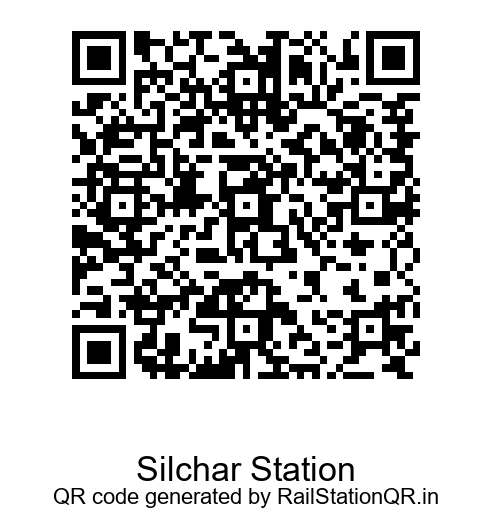
Here is the Silchar railway station QR code (SCL). Scan it as your Source Station QR in the RailOne app to book an unreserved or platform ticket. Many people still search for this as the UTS QR code.
Silchar Station QR Code Details
| Station | Silchar |
|---|---|
| Station Code | SCL |
| City | Silchar |
| District | {{Cachar |
| State | Assam |
| Railway Zone | Northeast Frontier Railway |
| Railway Division | Lumding |
QR Code · How to Scan · Station Details · FAQ
Silchar Station QR Code
How to Scan the Silchar QR Code in RailOne
- Open the RailOne app and log in.
- Choose Unreserved or Platform ticket.
- Tap At Station, then select Source and Scan QR Code.
- Scan the Silchar (SCL) QR code.
- Check journey and passenger details, tap Proceed to Book and pay.
- Open the ticket inside the app when asked.
Keep camera and location (GPS) permission on. App menus can change, so follow the latest on-screen steps.
New to this? Read what the Source Station QR means in RailOne. Payment problem? See RailOne payment failed, money deducted.
About Silchar Railway Station
| Station Name | Silchar Railway Station |
|---|---|
| Station Code | SCL |
| City | Silchar |
| District | Cachar |
| State | Assam |
| Railway Zone | Northeast Frontier Railway |
| Railway Division | Lumding |
Silchar (SCL) is in Silchar, Cachar, Assam. It comes under Northeast Frontier Railway, Lumding Division.
Silchar Railway Station (SCL) at a Glance
In this directory, Cachar district has 16 listed stations; the Lumding Division covers 175 listed stations; Assam has 322 station pages in this directory. Use the station code SCL when searching so you pick the right station in the app, because several stations can have similar names.
Page last updated: 18 October 2026. Station details can change; confirm the QR at the station before travelling.
More stations in the Lumding Division
UTS QR Code and RailOne
The earlier UTS on Mobile service is why people still search for the Silchar UTS QR code. For current QR ticketing, use the options available in RailOne.
Frequently Asked Questions
What is the station code of Silchar?
The station code is SCL.
Silchar ka station code kya hai?
Silchar ka station code SCL hai.
How do I scan the Silchar QR code on RailOne?
Open RailOne, choose Unreserved or Platform, tap At Station, select Source, scan the QR code and tap Proceed to Book.
Is the Silchar QR code always the same?
Station QR codes are meant to stay fixed, but always confirm with the QR displayed at the station if the app does not accept it.
Which zone and division is Silchar in?
It comes under Northeast Frontier Railway, Lumding Division.
The QR code is not scanning. What should I do?
Turn on camera and location permission, clean the camera lens and scan from a steady distance. If you are viewing this page on the same phone, use another screen or the QR at the station. Still not working? Use the report form below.
Report a Problem
Wrong or outdated QR? Tell us and we will fix it.
Report an Incorrect Information or QR Issue
Found incorrect station information or a QR code that is not working? Let us know so we can review and update the information.
Report an Issue
Disclaimer
RailStationQR.in is an independent informational website. It is not affiliated with, authorized by, or endorsed by Indian Railways, CRIS, IRCTC, RailOne, UTS, or the Ministry of Railways. Station details and app steps can change; always confirm in the official app or at the station.